
Digital marketing has consistently been changing over the years. Just look at the Google SERPs today — Google no longer just shows the standard 10 blue links.
Images, videos, popular products, the local pack, and more are now all a part of nearly any Google, Bing and Yahoo SERP.
Look at the below search query, and the various SERP features it includes. There are plenty of opportunities for the businesses to be a part of the SERP.
In this post, we’ll talk about one of those opportunities specifically: how to become a part of video content on the SERP.
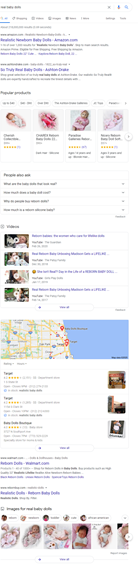
Google search is an entry point for people to discover and watch videos on a wide variety of topics. As per the Hubspot 2020 state of marketing, video was the #1 form of media used in content strategy, overtaking blogs and infographics in 2019.
Consumers don’t just love videos – they want as much of them as they can get. And as the SERP above points at, videos can appear in Google search results, video search results, Google Images, and Google Discover.
One thing that hasn’t changed, however, is the inability of crawlers to read media objects on web pages like video content.
While Google tries to automatically understand details about your video, you can explicitly provide information, such as the description, thumbnail URL, upload date, and duration, by marking up your video with schema markup.
The importance of video schema markup is crucial, and failing to implement it on your website or video pages will cause your video content to be less visible than the sites that are using this rich snippet.
That’s why we are going to go over the ins and out of video schema markup. Let’s get started.
Importance of Video Schema Markup — How It Makes a Difference
We won’t go into too much detail about what is structured data and how it’s important for search engines. In a simple term, structured data is a standardized format for providing information about a page and classifying the page content.
This helps search engines like Google understand the contents of the page, and gather information about the web and the world in general. Video schema markup works in the same way.
Without video schema markup, search engines might only know about the video’s title, description, and thumbnail — and that’s about it! With it, you are telling search engines about the content on a web page containing a video. You can tell those engines about the video’s duration, who has made it, who has starred in it, who the copyright holder is, and even put in a video transcript (which is good for SEO purposes!).
You can check a list of all the parameters you can use with video schema markup on this page, but the below parameters are essentials for video schema markup.
Required Properties
Name: the title of the video.
Description: the description of the video. HTML tags are ignored.
uploadDate: the date the video was first published, in ISO 8601 format
ThumbnailURL: a URL pointing to the video thumbnail image file.
Also keep in mind the following for your image thumbnail:
- Image URLs must be crawlable and indexable.
- Images must represent the marked-up content.
- Images must be in .jpg, .png, or. gif format.
- Images must be 60px by 30px, at minimum.
Recommended Properties
contentUrl: a URL pointing to the actual video media file, in one of the supported encoding formats. Don’t link to the page where the video lives; this must be the URL of the video media file itself.
Example: “contentUrl”: “https://www.example.com/video/123/file.mp4”
Duration: the duration of the video in ISO 8601 format. For example, T00H30M5S represents a duration of “thirty minutes and five seconds”.
embedUrl: a URL pointing to a player for the specific video, in one of the supported encoding formats. Don’t link to the page where the video lives; this must be the URL of the video media file itself. Usually this is the information in the src element of an <embed> tag.
Example: “embedUrl”: https://www.example.com/embed/123
Expires: if applicable, the date after which the video will no longer be available, in ISO 8601 format. Don’t supply this information if your video does not expire.
hasPart: if your video has important segments, nest the required Clip properties in your VideoObject.
Example:
<script type="application/ld+json">
{
  "@context": "http://schema.org/",
  "@type": "VideoObject",
  "name": "Cat video",
  "hasPart": {
    "@type": "Clip",
    "name": "Cat jumps",
    "startOffset": 30,
    "url": "http://www.example.com/example?t=30"
  }
}
</script>
interactionStatistic: the number of times the video has been watched.
"interactionStatistic":
  {
    "@type": "InteractionCounter",
    "interactionType": { "@type": "http://schema.org/WatchAction" },
    "userInteractionCount": 12345
  }
Publication: if your video is happening live and you want to be eligible for the LIVE badge, nest the BroadcastEvent properties in your VideoObject.
Example:
<script type="application/ld+json">
{
  "@context": "http://schema.org/",
  "@type": "VideoObject",
  "name": "Cat video",
  "publication": {
    "@type": "BroadcastEvent",
    "name": "First scheduled broadcast",
    "isLiveBroadcast": true,
    "startDate": "2018-10-27T14:00:00+00:00",
    "endDate": "2018-10-27T14:37:14+00:00"
  }
}
</script>
regionsAllowed: the regions where the video is allowed. If not specified, then Google assumes the video is allowed everywhere. Specify the countries in ISO 3166 format.
Optimizing Your Videos with Video Schema Markup
Now that you know that there are multiple tags you can use in the markup, let’s cover how you can use them. Based on how you mark up your content, your videos may also be eligible for the following video enhancements:
Standard Video Rich Result
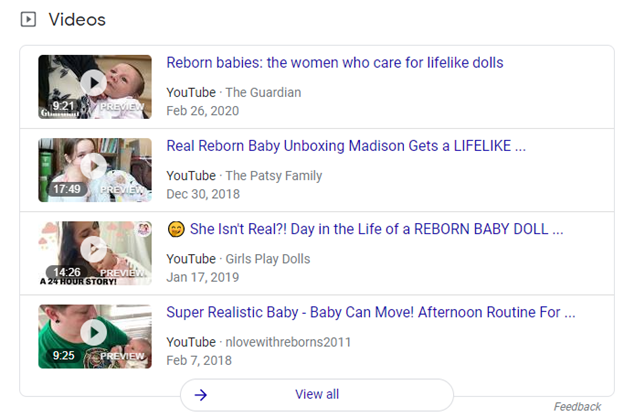
Here’s an example of a single VideoObject
<html>
  <head>
    <title>Introducing the self-driving bicycle in the Netherlands</title>
    <script type="application/ld+json">
    {
      "@context": "https://schema.org",
      "@type": "VideoObject",
      "name": "Introducing the self-driving bicycle in the Netherlands",
      "description": "This spring, Google is introducing the self-driving bicycle in Amsterdam, the world’s premier cycling city. The Dutch cycle more than any other nation in the world, almost 900 kilometres per year per person, amounting to over 15 billion kilometres annually. The self-driving bicycle enables safe navigation through the city for Amsterdam residents, and furthers Google’s ambition to improve urban mobility with technology. Google Netherlands takes enormous pride in the fact that a Dutch team worked on this innovation that will have great impact in their home country.",
      "thumbnailUrl": [
        "https://example.com/photos/1x1/photo.jpg",
        "https://example.com/photos/4x3/photo.jpg",
        "https://example.com/photos/16x9/photo.jpg"
       ],
      "uploadDate": "2016-03-31T08:00:00+08:00",
      "duration": "PT1M54S",
      "contentUrl": "https://www.example.com/video/123/file.mp4",
      "embedUrl": "https://www.example.com/embed/123",
      "interactionStatistic": {
        "@type": "InteractionCounter",
        "interactionType": { "@type": "http://schema.org/WatchAction" },
        "userInteractionCount": 5647018
      },
      "regionsAllowed": "NL"
    }
    </script>
  </head>
  <body>
  </body>
</html>
LIVE Badge

Get a LIVE badge added to your video by marking your video with BroadcastEvent. The LIVE badge can be applied to any public video that is live-streamed for any length of time.
Consider adding the LIVE badge for sporting events, award shows, influencer videos, or live-streamed video game sessions.
Make sure you follow the LIVE badge guidelines and use the Indexing API to ensure Google crawls your page at the right time.
<html>
  <head>
       "name": "Bald eagle nest livestream!",
      "thumbnailUrl": "https://example.com/bald-eagle-at-the-park",
      "uploadDate": "2018-10-27T14:00:00+00:00",
      "publication": [
        {
          "@type": "BroadcastEvent",
          "isLiveBroadcast": true,
          "startDate": "2018-10-27T14:00:00+00:00",
          "endDate": "2018-10-27T14:37:14+00:00"
        },
        {
          "@type": "BroadcastEvent",
          "isLiveBroadcast": true,
          "startDate": "2018-10-27T18:00:00+00:00",
          "endDate": "2018-10-27T18:37:14+00:00"
        }
      ]
    }
    </script>
  </head>
  <body>
  </body>
</html>
Home Activities
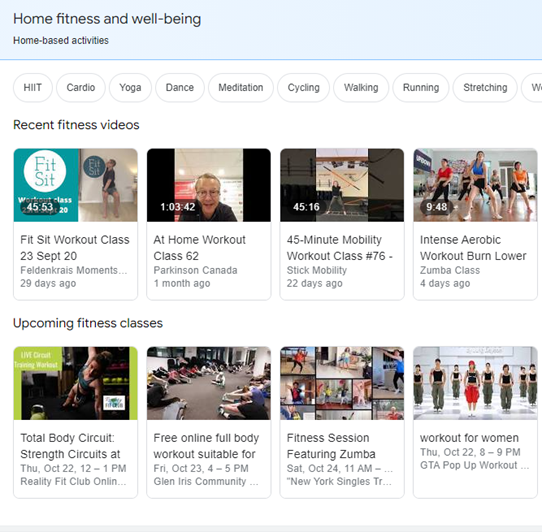
To help people discover activities that they can do from home, you can add structured data to your online event and video pages.
When people search for activities to do at home, videos and online events appear in a rich result. People can click a video or class and see more details, such as a description of the activity, how to register, or watch now.
Examples of home activity content types include upcoming video livestreams, a pre-recorded video, or an online event. For more information about feature availability, guidelines, and examples, see Home activities.
Clips (Limited Access)
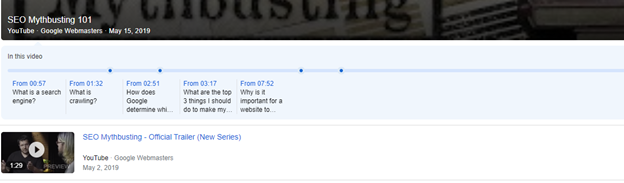
Mark important segments in your video to help users quickly navigate to specific points in a video.
If your video is hosted on YouTube, Google Search may automatically enable clips based on the video description on YouTube. Check out the best practices for marking timestamps in YouTube descriptions.
If your video is hosted on your web page, you can add Clip structured data to your VideoObject to help Google understand the important points in your video.
This feature is currently limited to a small set of providers.
Below is the code example:
<html>
  <head>
    <title>Cat jumps over the fence</title>
    <script type="application/ld+json">
    {
      "@context": "http://schema.org/",
      "@type": "VideoObject",
      "name": "Cat video",
      "duration": "P10M",
      "uploadDate": "2019-07-19",
      "thumbnailUrl": "http://www.example.com/cat.jpg",
      "description": "Watch this cat jump over a fence!",
      "contentUrl": "http://www.example.com/cat_video_full.mp4",
      "regionsAllowed": "US",
      "hasPart": [{
        "@type": "Clip",
        "name": "Cat jumps",
        "startOffset": 30,
        "endOffset": 45,
        "url": "http://www.example.com/example?t=30"
      },
      {
        "@type": "Clip",
        "name": "Cat misses the fence",
        "startOffset": 111,
        "endOffset": 150,
        "url": "http://www.example.com/example?t=111"
      }]
    }
    </script>
  </head>
  <body>
  </body>
</html>
How to Implement Video Schema Markup
Don’t let the code examples intimidate you — implementing the video schema (and other schema types, too) is as easy as point and click. Everything you need to build and deploy schema is now housed in a free Google Chrome plug-in.
Schema.dev introduced Schema Builder so users can build and deploy structured data without a developer.
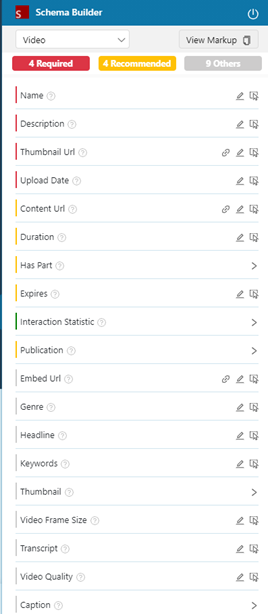
As you can see, the process is as easy as putting the right tags into the HTML code. There are, however, certain suggestions to keep in mind.
Be sure that the video schema markup is visible without executing JavaScript or Flash to guarantee access to the search engines. Use a text-only browser to test this or disable both manually before trying it on your regular browser.
Make sure you use a relevant keyword phrase throughout the video markup. Use the phrase in the title, description, the video page and in the transcription (if possible). This will ensure your video finds its intended audience more easily.
Test the markup using Google’s Structured Data Testing Tool. The only way you can be sure your videos show as you want them to in the SERPs is by checking and adjusting them by yourself.
Conclusion
The benefits of using video schema markup are quite clear. Standing out in search results with content as vital as the video is easier with this markup. That is because it serves a double purpose: on the one hand, it gives search engines all the information they need to perfectly display what the video is about with the right amount of details. The end-user then benefits from this enhanced display.